

We run a holding company with 4 operating companies and counting. Two are advisory businesses. One is in the credit space. One is an educational incubator. Another is an infrastructure/software offer. On top of that, we're building internal tools and a growing fleet of web app products across the stack.
That means we're on calls constantly — with members, borrowers, partners, team members, prospects, and clients. Calls about sales, outbound, offers, fulfillment, internal systems, product ideas, and strategy.
And for the longest time, all of that context lived in one place: our heads. That becomes a serious bottleneck when you're trying to build fast.
Because every time you want to create something new — a landing page, a course module, a lead magnet, a sales script, an SOP, a piece of content, an onboarding manual, a product brief — you have to re-explain your whole world from scratch. What your offer is. How you think. How you diagnose. What your clients struggle with. What your students struggle with. What your team keeps repeating. What patterns you've noticed. What language people use. What frameworks you use. What makes a good opportunity vs a bad one.
That is exhausting.
So we built a system that takes all of our Fathom calls, pulls them into Obsidian, enriches them with AI, and turns them into a living knowledge base. Not a transcript dump. A real operating brain.
And if you run any kind of online, service-based, advisory, coaching, consulting, education, agency, or call-heavy business, this can become one of the highest-leverage systems you build.
What This System Actually Does
At a very simple level, the workflow is:
- Fathom records the calls.
- A local script pulls them through the API.
- AI processes the transcripts.
- Obsidian stores the output as structured notes.
- Those notes get synthesized into living documents.
So instead of a bunch of dead recordings, you end up with a business memory system.
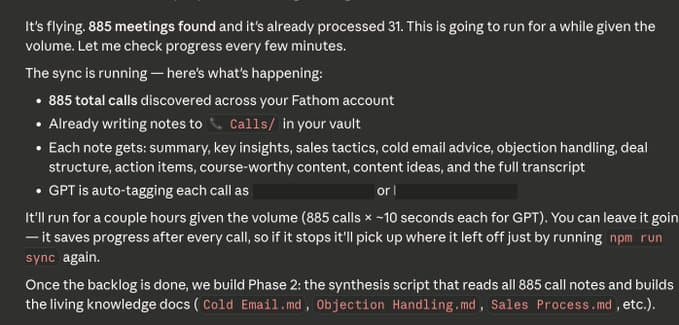
That means every call can feed into things like:
- Curriculum and course modules
- Sales playbooks
- Onboarding docs and SOPs
- Objection libraries
- Email swipe files
- Content ideas
- Landing pages and lead magnets
- Offer refinement
- Process documentation
- Internal training material
- Product documentation
And over time, it compounds. Because now every call does more than solve the problem in front of you. It teaches the business.
Why This Matters So Much
If you run a call-heavy business, your best IP is usually trapped inside conversations. Not in your Notion docs. Not in your SOP folder. Not in your course portal. Not in your CRM. Inside conversations.
That's where the nuance lives. The tiny fixes. The judgment calls. The explanations. The pattern recognition. The diagnosis. The wording. The scripts. The reframes. The edge cases. The "this is why this is actually not working" moments.
Then the call ends and it disappears. That is the waste. This system fixes that.
How We're Using It Across Our Companies
We're using it across a few different layers of the business.
1. Educational / Incubator Calls
This is where members or students ask questions, get feedback, get tactical help, get sales help, get outbound help, get positioning help, get scripts reviewed, get bottlenecks diagnosed, and get coached through implementation.
Those calls are pure gold. Because inside those calls are:
- The most repeated student mistakes
- The biggest growth bottlenecks
- The missing pieces in the curriculum
- The things we explain over and over
- The frameworks that should be formalized
- The language that resonates best
- The places where people need better process
That can all be turned into:
- New course modules and better curriculum
- Playbooks, exercises, and templates
- Lead magnets and social content
- Better onboarding
2. Advisory / Client / Borrower Calls
These calls are less about teaching and more about evaluating opportunities, spotting patterns, qualifying fit, understanding where deals stall, identifying recurring missing information, seeing what strong clients have in common, and turning recurring explanations into scripts and SOPs.
That can become:
- Intake frameworks and qualification checklists
- Client onboarding manuals
- Internal SOPs and discovery scripts
- Pre-call checklists and deal-screening logic
- Better client education
3. Team / Operations / Internal Build Calls
These are all the internal conversations that usually vanish after the meeting. But they often contain repeated decision logic, process evolution, tool choices, hiring logic, project strategy, internal systems thinking, product discussions, and recurring operational friction.
That can become:
- Internal documentation and training guides
- Build notes and product specs
- Operating principles and process manuals
The Real Unlock: Intersections
The coolest part of this system is not just storing the calls. It's being able to ask better questions across all of them. For example, once you have hundreds of calls in the vault, you can ask:
- What are the biggest gaps across 100 student calls?
- What are the most repeated mistakes people make before they get momentum?
- What topics do we keep reteaching that should already be modules?
- What patterns do our best students have in common?
- What language do people use when they describe the same pain point?
- What ideas intersect across sales, outbound, positioning, onboarding, and retention?
- What client issues should have become SOPs already?
- What explanations have we repeated enough times that they should now live as permanent assets?
That is where it stops being "a vault of notes" and starts becoming real leverage.
How to Set This Up Step by Step
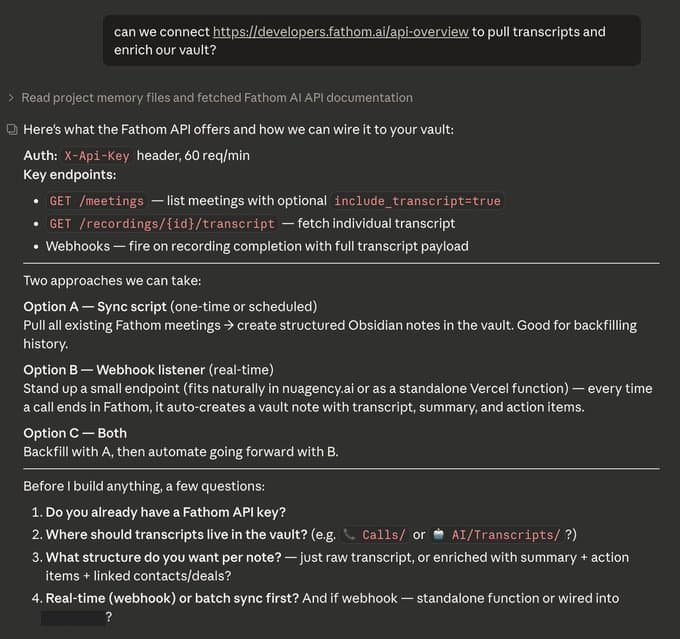
We started with a simple question inside of Claude Code. Here's exactly how we'd recommend someone set this up from scratch.
Step 1: Download Obsidian and Create Your Vault
Download Obsidian from the Obsidian website and install it on your computer. A vault is just a folder on your machine where all your notes live. When you create the vault, you're also choosing the file path your scripts will write into later.
We put ours in the same general area as our coding projects so everything lives close together. You can create one vault per business, or one vault for everything.
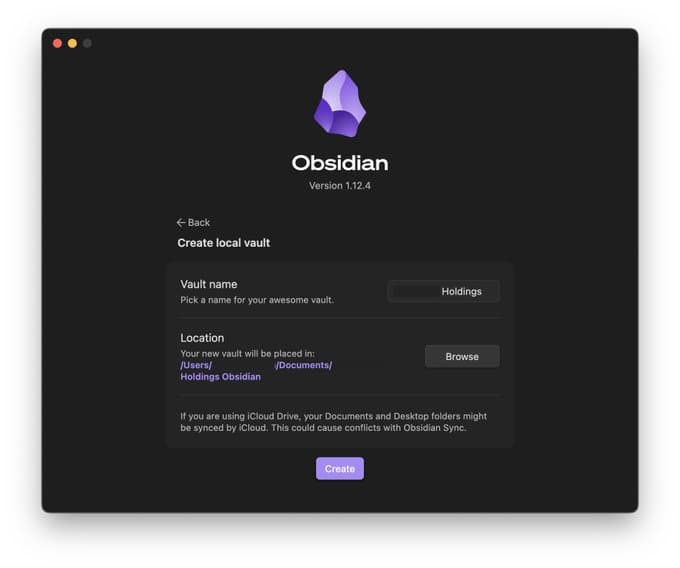
We chose one vault across all our businesses because there's a lot of overlap between them, and we want the cross-pollination. A lot of the value comes from ideas, systems, and patterns intersecting across companies.
Before touching code, get clear on what you actually want this system to do. For most people, the best starting point is one or more of these:
- Store every call as a structured note
- Turn repeated insights into living docs
- Stop re-explaining the business to AI
- Create content from real conversations
- Create course material from real student problems
- Turn recurring explanations into SOPs
- Make internal knowledge searchable
Step 2: Choose Obsidian as the Memory Layer
Obsidian works well for this because it's just a folder of local Markdown files. That means your script can write directly into the vault. You do not need some fancy database to get started. A practical folder structure might look like this:
Calls/
Cold Email/
Sales/
Offers/
Curriculum/
Members/
Marketing/
Finance/
Deals/
Partners/
Projects/
AI/
Tools & Stack/
Internal/
.scripts/
The point is to create a place where raw call notes can live, and where synthesized knowledge can live separately.
Step 3: Get Your Fathom API Key
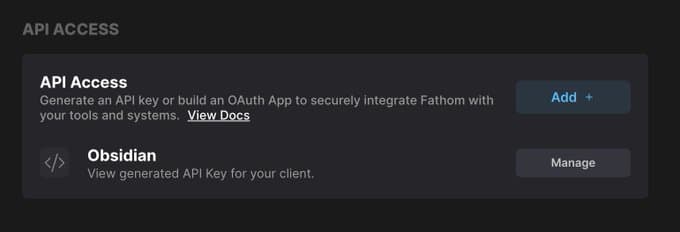
Inside Fathom, generate your API key from the API settings area (Settings → API). That key is what allows your script to list meetings and fetch transcripts.
Step 4: Create a Local .scripts Folder
Inside the root of your Obsidian vault, create a hidden folder called .scripts. That folder holds your sync script, .env file, package.json, dependencies, processed state file, and any helper scripts.
Your Vault/
  Calls/
  Cold Email/
  Curriculum/
  AI/
  .scripts/
    .env
    .gitignore
    package.json
    fathom-sync.ts
Step 5: Keep Secrets Out of Your Sync Flow
If your vault syncs to the cloud, be careful with .env. If you use Obsidian Sync, exclude .scripts if possible. If you use iCloud or another file sync layer, understand that anything inside the vault may get copied.
- Use a .gitignore
- Never commit .env
- Keep your keys local
- Be deliberate about where secrets live
Step 6: Create Your .env File
Inside .scripts, create an .env file that holds your secrets and local config:
FATHOM_API_KEY=your_fathom_key_here
OPENAI_API_KEY=your_openai_key_here
VAULT_PATH=/Users/yourname/Documents/YourVaultStep 7: Initialize the Script Project
Inside .scripts, initialize a small Node project. Typical files:
package.json
.env
.gitignore
fathom-sync.ts
processed.json
Install the basic dependencies at minimum:
- dotenv
- openai
- tsx
- typescript
Your .gitignore should include at least:
.env
node_modules
processed.json
Step 8: Build the Fathom Sync Script
This script is the engine. At a high level, it needs to:
- Authenticate with Fathom using your API key
- Fetch meetings with pagination
- Pull each transcript by recording ID
- Send that transcript to the model
- Receive structured output
- Write a Markdown note into Obsidian
- Track what has already been processed
- Retry when rate limits or quota issues happen
This is where Claude Code becomes useful. You can hand it the Fathom API docs, your vault structure, and your business context, and have it help build the script in TypeScript. That is exactly the kind of work it's good at.
Step 9: Run in Discovery Mode First
Before you process hundreds of calls, test the API responses. Real-world APIs are always messier than you expect. You may discover:
- Pagination behaves a certain way
- Transcripts are not included in the meeting list
- Participant fields are named differently than you assumed
- Recording IDs are needed for transcript retrieval
- Some fields are null
- Not every meeting is structured the same
Test with a few records first. Make sure you can list meetings, fetch transcripts, parse the data, and that your note format looks right.
Step 10: Design the Note Schema Properly
Do not settle for "summary + transcript." That's too weak. Each note should be structured in a way that makes it useful later.
For student / incubator calls, useful fields might include:
- Call type, stage, category, topics
- Summary and diagnosis
- Main teaching and exact scripts
- Frameworks referenced
- Action items
- Course material ideas and content angles
- Transcript
For advisory / client / borrower calls, useful fields might include:
- Call type, company / prospect / borrower
- Opportunity type and use of proceeds
- Blockers and qualification issues
- Next steps
- Capital structure or deal notes
- Key takeaways and transcript
Not every business call should be analyzed the same way. That difference is important.
Step 11: Customize the Prompt to Your Business
This is where most of the value comes from. The better your prompt, the more useful your notes become. You want the model to understand what kind of business this is, what kinds of calls it's reading, what "good output" looks like, what topics matter, and how different business units should be treated.
For educational calls, you want it to notice teaching moments, repeated problems, exact tactical guidance, missing curriculum opportunities, and content-worthy ideas. Example prompt structure:
You are analyzing a coaching call transcript from [NAME]'s Advisory Incubator program.

CONTEXT: [NAME] teaches B2B revenue advisory / demand generation sales. His students
(called members) sell a service where they generate qualified introductions, pipeline,
or revenue for B2B companies — typically on retainer.

KEY FRAMEWORKS (identify and name these when they appear):
- The Wedge: a specific entry point in the client's sales funnel
- Prescription Model: prescribes actions rather than asking — leads, doesn't follow
- LTV Alignment: pricing based on the prospect's lifetime customer value
- We Language: framing the engagement as collaborative to create buy-in
- The Opener/Closer: structured start and end to every discovery call
- Diligence Phase: extraction-only mode during discovery — no pitching, just asking

Return a JSON object with EXACTLY these keys:
{
  "category": "Advisory Incubator",
  "callType": "Email Review" | "Discovery Call Review" | "Deal Coaching" | "Onboarding" | "General Check-in",
  "memberStage": "Building Lists" | "Cold Email" | "Getting Replies" | "In Discovery" | "Closing" | "Managing Clients",
  "memberNiche": "what industry/market this member is targeting",
  "topics": ["Cold Email", "Objection Handling", "Pricing", "Prospecting", "Discovery Calls", ...],
  "summary": "2-3 sentences — what happened, what was the main problem, what was resolved",
  "diagnosis": "1-2 sentences: what is the ACTUAL core problem — not the surface complaint, the real issue",
  "mainTeaching": "The single most important thing taught on this call. Specific and quotable.",
  "exactScripts": ["VERBATIM language given — email copy, objection responses, call openers/closers"],
  "frameworksReferenced": ["Named frameworks that came up + how they were applied"],
  "keyInsights": ["Every specific piece of advice. Use exact language. Do not paraphrase."],
  "coldEmailAdvice": ["Subject lines, hooks, angles, copy critiques, structure, deliverability"],
  "objectionHandling": ["Format: OBJECTION: '[what prospect said]' → REFRAME: '[how to handle it]'"],
  "dealStructure": ["Pricing ranges, retainer terms, scope specifics, LTV math, ROI framing"],
  "actionItems": ["Who does what by when — be specific"],
  "courseMaterialIdeas": ["MODULE TITLE: '[title]' — COVERS: '[what this teaches, why it matters]'"],
  "contentAngles": ["Specific hooks — not 'a thread about X' but the actual insight from this call"]
}

Extract EVERYTHING. This is being used to build a course, stop repetition, and create content.
For advisory calls, you want it to notice opportunity quality, process friction, recurring client problems, qualification patterns, and internal SOP opportunities. Example prompt structure:
You are analyzing a business call transcript from [NAME]'s capital advisory operations.

CONTEXT: These calls are deal introductions, capital raises, investment discussions, or
business development — NOT coaching calls. Common deal types include: franchise
acquisitions, real estate (ABL, bridge loans, construction lending), revenue advisory
partnerships, and capital introductions.

Return a JSON object with EXACTLY these keys:
{
  "category": "Capital Advisory",
  "callType": "Deal Introduction" | "Deal Review" | "Partner Call" | "Internal" | "Other",
  "topics": ["Deal Structure", "Capital Raise", "Franchise", "Real Estate", "ABL", ...],
  "summary": "2-3 sentences — who was on the call, what deal was discussed, what was the outcome",
  "dealType": "Specific deal type — franchise acquisition, ABL loan, revenue advisory, etc.",
  "company": "Name of the company or individual being discussed",
  "capitalStructure": "Deal terms, amounts, structure, or financial details. 'Not discussed' if none.",
  "ourRole": "Our specific role — introducer, advisor, operator, capital matcher, etc.",
  "keyParties": ["Name and role of each person on the call"],
  "blockers": ["Concerns, objections, open questions, or things preventing the deal moving forward"],
  "nextSteps": ["Specific next steps — who does what"],
  "keyInsights": ["Notable strategic points about deal positioning, capital approach, or terms"]
}
Step 12: Process a Tiny Sample First
Do not run 800 calls on version one. Run 2 first. Then 10. Then 25. Read them. Ask yourself:
- Is the call type accurate?
- Is the diagnosis useful?
- Did it capture the actual teaching?
- Did it miss exact scripts?
- Are the topics too broad?
- Is the content extraction lazy?
- Is it mixing business categories?
Then improve the prompt. That one step saves a lot of cleanup later.
Step 13: Add Retry Logic Before the Big Run
If you're processing a big backlog, you will hit API rate limits, quota/billing issues, network hiccups, malformed responses, or long-running interruptions. Build retry logic early — especially for Fathom API requests and model API requests. Exponential backoff helps a lot:
- Wait 15 seconds
- Then 30
- Then 60
- Then 120
Step 14: Track Processed Calls
You need a durable way to remember what has already been imported. The easiest version is a local processed.json file. That lets you stop safely, restart safely, backfill over multiple sessions, and run incremental sync later. Without that, this gets annoying fast.
Step 15: Run the Backlog Locally
Once your small tests look good, run the full backlog. If you're on a Mac and don't want sleep to kill the process, run it with:
caffeinate -i npm run syncThat keeps the machine awake while the sync is running — especially useful when pulling hundreds of calls.
Step 16: Watch the Log
Pipe your script output to a log file so you can watch it in real time:
tail -f /tmp/fathom-sync.logThat way you can see pages being fetched, meetings found, calls processed, retries happening, failures, and progress count. This makes debugging much easier.
Step 17: Expect Billing and Quota Hiccups
If you run a large backlog through a model API, eventually you may hit spending limits, prepaid credit issues, monthly caps, or per-minute throttling. The key is understanding the difference between a real rate limit (means "wait") and a quota/billing stop (means "add credits or raise limits"). If you're processing a lot of calls, turn on auto-recharge or make sure your billing is ready beforehand.
Step 18: Let the Raw Call Notes Land First
Step 19: Build the Synthesis Layer Second
Once the raw notes exist, then build the real leverage layer. This is where you start creating living docs like:
- Sales Process and Cold Email playbooks
- Follow-Up and Objection Handling guides
- Curriculum Gaps and Discovery Calls analysis
- Qualification and Onboarding docs
- Borrower Patterns and Internal SOP Opportunities
- Best Teaching Moments and Content Queue
This is the phase where the system starts to feel magical. Because now you're not reading one call at a time. Now you're asking what shows up across 50 calls, across 100, across categories, and what deserves to become permanent IP.
Step 20: Use the Vault to Create Assets
From the educational/incubator side, you can create:
- New course modules, lesson outlines, and playbooks
- Worksheets, templates, and content pillars
- Giveaways, swipe files, and lead magnets
From the advisory side, you can create:
- Intake forms and screening frameworks
- Onboarding manuals and qualification SOPs
- Internal scripts and pre-call prep docs
- Sales collateral and process checklists
From the internal side, you can create:
- Project docs and process docs
- Build notes and team training material
- Internal operating manuals
That's the real flywheel.
The Biggest Mistake to Avoid
Do not treat this like a transcript storage project.
It is not a transcript dump. It is a knowledge conversion project.
How Someone Else Could Use This
Maybe you don't run a holding company. Maybe you have:
- An agency or consulting firm
- A coaching or advisory business
- A productized service
- A sales team or recruiting firm
- A startup with lots of customer calls
This still applies. For you, the use case might be:
- Customer research and objection tracking
- Call review and script improvement
- Onboarding refinement and content creation
- Training material and founder knowledge capture
- Team enablement
Same system. Different prompt.
The Highest-Leverage Questions This Unlocks
Once the system is running, these are the kinds of questions that become valuable:
- What are we repeating constantly that should already be formalized?
- What problems are most common across our clients or students?
- What language keeps showing up around the same pain point?
- What are the biggest gaps in our curriculum?
- What parts of our process are too founder-dependent?
- What should become an SOP right now?
- What objections should our landing page handle better?
- What themes deserve a content series?
- What do our best customers have in common?
- What causes the most stalled momentum?
- What could we build once so we stop saying it 100 more times?
Final Thought
This system changed the way we think about calls.
Before, a call was just a call. Now a call is:
- A lesson and a diagnostic record
- A pattern source and a future SOP
- A course module and a script
- A landing page insight and a content seed
- A process improvement and a piece of company memory
If you take a lot of calls, you are already generating a massive amount of intellectual property. The only question is whether it dies in conversations or compounds into assets.
This is how you make it compound.
Need cold email volume?
Done-for-you mailboxes for outbound
InfraSuite is built for teams that rely on cold email as a core revenue channel and need stable, high-performing Outlook mailboxes. You subscribe to a proven Microsoft-based sending environment that's already configured for cold outreach — provisioning, DNS, mailbox setup, and deliverability hygiene handled for you.
- Stable inbox placement across Outlook and Google
- Fewer resets, fewer domain swaps
- Capacity ready when clients sign
- Calm, competent support when something looks off